


Markdown Formatting Guidelines
Markdown is a simple, versatile tool for formatting text. Whether you’re creating a blog post, a documentation page, or a personal note, these guidelines will help you produce clean, readable content:
Headings
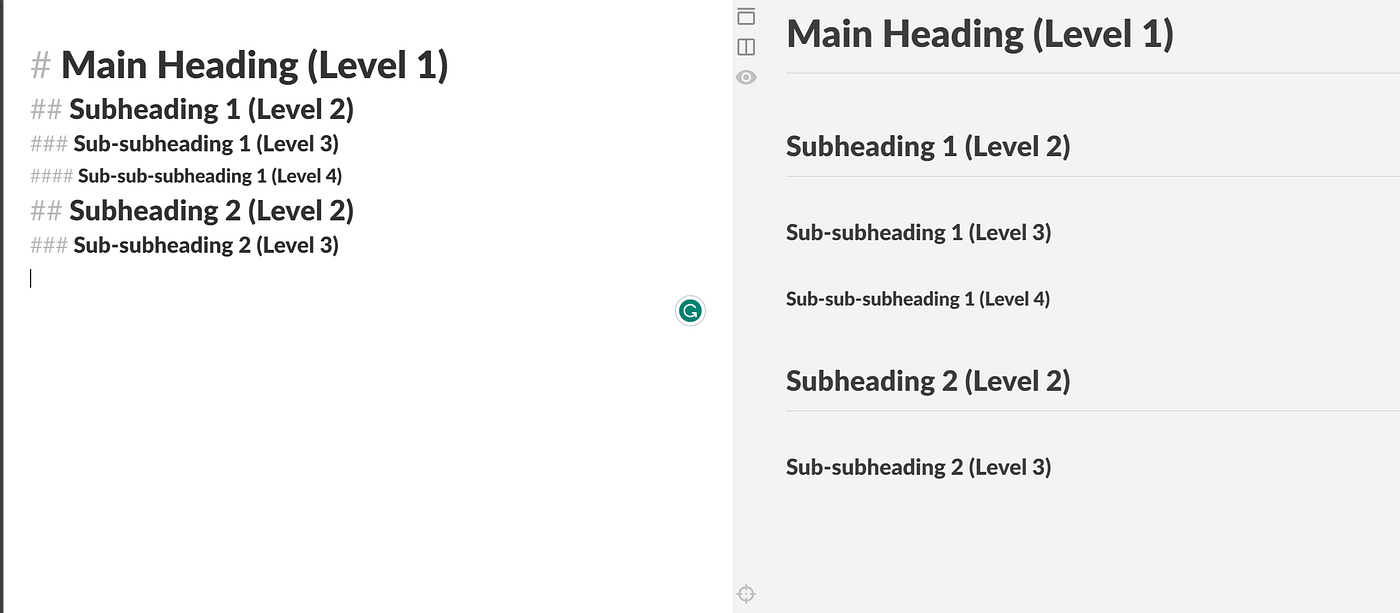
Use number signs (#) to define headings. The number of signs indicates the heading level—# for main headings, ## for subheadings, and ### for sub-subheadings. This hierarchy helps organize your content and improve scannability.
List Items
Start unordered list items with a dash (-). For nested lists, indent the dash with a tab or two spaces. This structure works for everything from simple to-do lists to complex outlines.
Emphasis
Add emphasis to text using asterisks (*). Wrap a word or phrase in one asterisk for italicized text (*italic*) or two for bold text (**bold**). This draws attention to key points without cluttering your content.
Code or Commands
Distinguish code snippets, commands, or technical terms by surrounding them with backticks (). For example,print(“Hello, World!”)ornpm install` makes these elements stand out from regular text, which is crucial for clarity in technical writing.
Quoted Text
Use greater than signs (>) to denote quoted text. This is ideal for citing sources, highlighting excerpts, or separating feedback from your main content. For example:
“The simplest way to master Markdown is through consistent practice.”
Links
Create clickable links by wrapping the display text in square brackets ([]) followed by the URL in parentheses (()). For instance, [Learn More](https://www.example.com) makes it easy for readers to access additional information without disrupting your flow.
Images
Embed images using a similar syntax to links, but add an exclamation mark (!) at the beginning. The square brackets contain alt text (for accessibility), and the parentheses hold the image URL: . This ensures your images are descriptive and usable for all readers.
By following these rules, you’ll create content that’s both functional and aesthetically pleasing—perfect for any publish-ready project.


